Shield Settings
The Shield Settings section allows you to configure the basic operation and behavior of your Generative Shield.
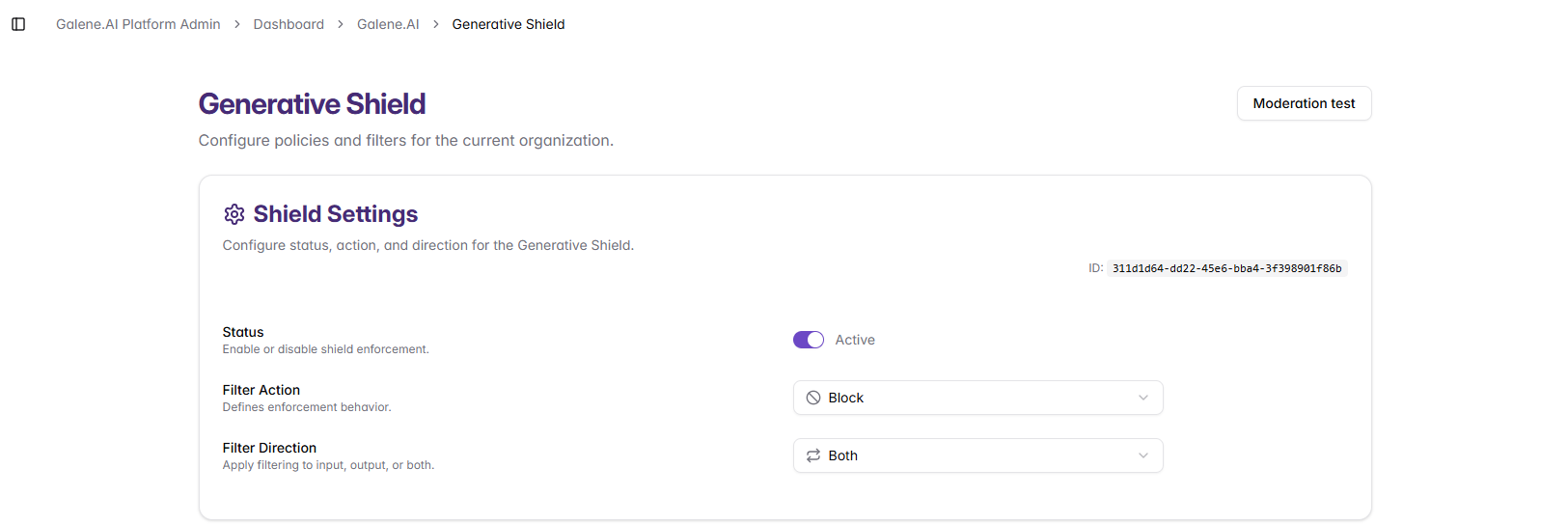
Configuration Options
Status
Enable or disable shield enforcement:
- Active: The shield is enabled and actively filtering content
- Inactive: The shield is disabled and content passes through unfiltered
Filter Action
Define what happens when the shield detects problematic content:
- Block: Block unsafe content and prevent it from proceeding
- Detect: Flag risky content while allowing conversations to continue uninterrupted
- Rewrite (Coming Soon): Rewrite unsafe parts of the content
Filter Direction
Control which parts of the conversation are filtered:
- Input Only: Filter user messages and prompts before they reach the AI
- Output Only: Filter AI responses before they're delivered to users
- Both: Filter both user inputs and AI outputs (recommended for maximum protection)
Shield ID
Each shield configuration has a unique identifier (shown in the interface) that can be used for API integration, monitoring, and troubleshooting purposes.
Shield Priority and Inheritance
The organization-level shield applies baseline protection to all agents and conversations within your organization. When a shield configuration is set for a specific Organization Agent, the agent-level shield takes complete precedence and the organization-level shield is not applied to that agent. The organization-level shield remains active for all other agents and conversations.
Common Issues
Unexpected Blocking: Check Filter Action settings and review Filter Direction scope. Switch to "Detect" temporarily to monitor flagged content without interrupting conversations.
Shield Not Working: Verify Status is "Active", confirm changes were saved, and check that filters are enabled.
Next Steps
After configuring basic shield settings:
- Set up Standard Filters for common content categories
- Create Custom Filters for organization-specific needs
- Enable Cybersecurity Protection for security threats
- Test your configuration using the Management and Testing tools