Generative Shield Overview
The Generative Shield is a comprehensive content moderation and security system that protects your AI agents and organization from inappropriate, harmful, or unwanted content. It provides multiple layers of filtering and control to ensure safe AI interactions while maintaining productivity and effectiveness, serving as both a security layer and a compliance framework to help organizations align with regulatory requirements of the EU AI Act.
Protection Levels
The Shield system offers two levels of protection:
- Organization-Level Shield - Applied to all agents and users within your organization
- Agent-Level Shield - Applied to individual Organization Agents for targeted protection
Shield filters content at multiple points in the AI interaction flow, scanning user inputs before they reach agents and reviewing AI-generated outputs before delivery to users. Administrators can configure bidirectional protection (both inputs and outputs) or filter in a single direction based on organizational needs.
Key Features
Standard Filters: Pre-configured content filters organized by EU AI Act risk categories, covering areas like violent crimes, immoral/unethical behavior, profanity, and other sensitive content.
Custom Filters: User-defined content moderation rules configured entirely in natural language—no coding required. Define allow/deny criteria with custom examples and configurable sensitivity levels for precise control over what content is permitted or blocked.
Cybersecurity Protection: Specialized filters to detect and prevent jailbreaking attempts, and other malicious prompts designed to bypass safety controls or extract sensitive information.
Accessing Shield Configuration
Organization-Level Shield Configuration
To configure shield protection for your entire organization:
- Navigate to your organization's admin panel
- From the left sidebar, select Generative Shield
- Configure the shield settings that will apply to all agents and users
The organization-level interface provides comprehensive control over all shield features and settings.
Agent-Level Shield Configuration
To configure shield protection for a specific Organization Agent:
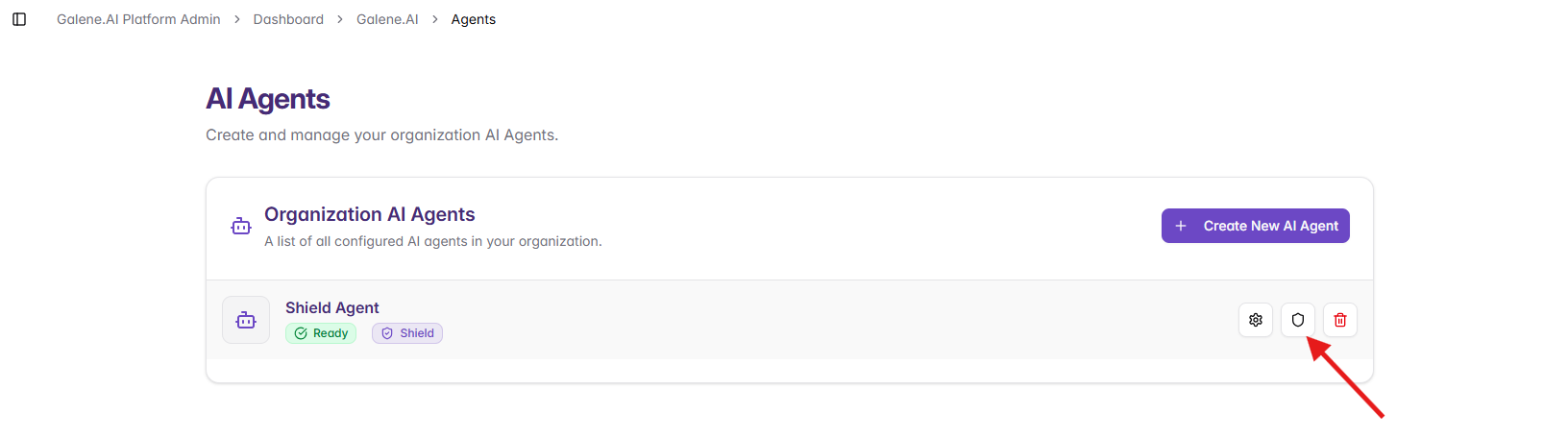
- Navigate to Agents in your admin panel
- Select the agent you want to protect
- In the agent list, look for the shield icon next to the agent name
- Click the shield icon to access agent-specific shield settings
The agent-level shield configuration interface is identical to the organization-level interface but applies only to that specific Organization Agent.
Shield Configuration Components
The Generative Shield system consists of five main configuration areas:
Settings
Shield Settings - Configure basic shield operation including enable/disable status, filter actions (block or log), and filtering direction (input, output, or both).
Standard Filters
Standard Filters - Enable pre-configured content filters organized by EU AI Act risk categories. Covers violent crimes, immoral/unethical behavior, profanity, child safety, and other sensitive content with adjustable sensitivity levels.
Custom Filters
Custom Filters - Create organization-specific moderation rules using natural language. Define custom allow/deny criteria with examples to precisely control content boundaries for your use case.
Cybersecurity Protection
Cybersecurity Protection - Enable specialized filters to detect prompt injection, jailbreaking attempts, and malicious prompts. Protects against attacks designed to bypass safety controls or extract sensitive information.
Management & Testing
Management - Test shield configurations, review blocked content logs, optimize filter performance, and troubleshoot false positives/negatives.
Getting Started
If you're configuring Generative Shield for the first time, follow this workflow:
- Review Requirements: Understand your organization's content moderation and compliance needs
- Configure Basic Settings: Enable shield and set filtering direction in Settings
- Enable Standard Filters: Activate relevant pre-configured filters in Standard Filters
- Create Custom Filters: Add organization-specific rules in Custom Filters
- Enable Cybersecurity: Activate threat detection in Cybersecurity Protection
- Test Configuration: Use testing tools in Management and Testing to validate behavior
- Deploy & Monitor: Roll out to production and review blocked content regularly
Quick Reference
- Enable/disable shield? → Settings
- Block harmful content? → Standard Filters
- Custom moderation rules? → Custom Filters
- Prevent jailbreaking? → Cybersecurity Protection
- Test and troubleshoot? → Management