Custom Filters
Custom Filters allow you to create organization-specific content moderation rules tailored to your unique requirements and business context.
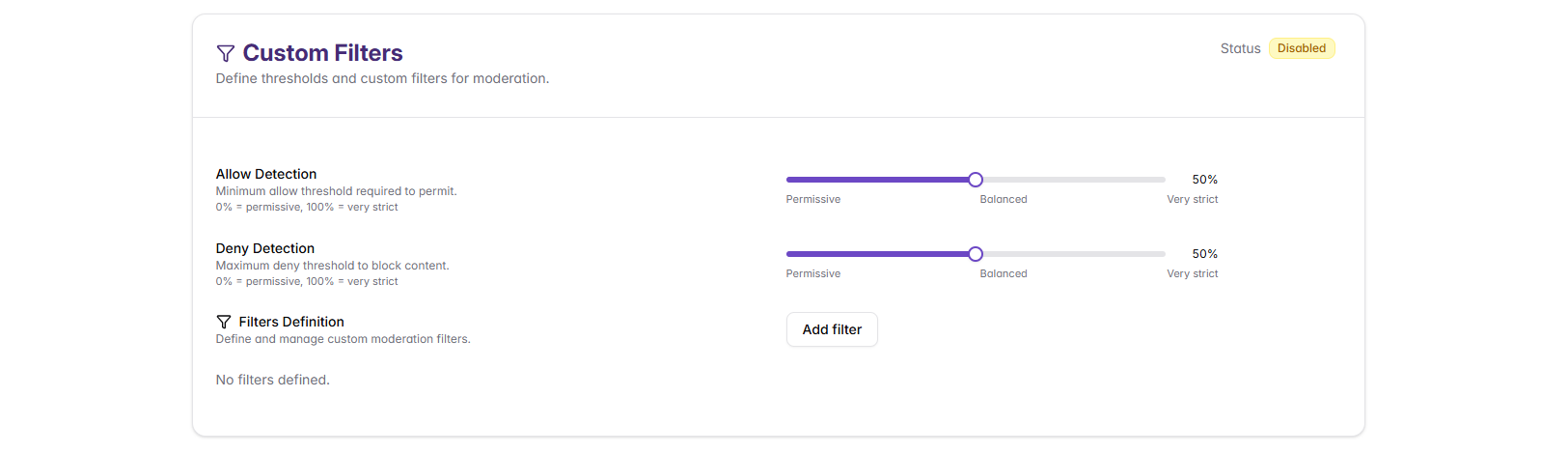
Detection Threshold Settings
Custom filters can specify content that should be allowed, content that should be denied, or both. The detection thresholds control how sensitive the filter is when matching content against your examples and prompts.
Allow Detection Threshold
Controls how closely content must match your Allow Examples and Allow Prompt to be permitted.
Slider range: 0% (accepts loose matching to allow content, making the filter more permissive) to 100% (requires very strict matching to allow content, making the filter more restrictive)
- Lower percentages = Allows content with loose similarity to allow examples (more permissive allowing)
- Higher percentages = Requires closer match to allow examples to permit (more restrictive allowing)
- When to adjust: If legitimate content is being blocked, lower this threshold
Deny Detection Threshold
Controls how closely content must match your Deny Examples and Deny Prompt to be blocked.
Slider range: 0% (accepts loose matching to block content, making the filter more permissive in blocking) to 100% (requires very strict matching to block content, making the filter more restrictive in blocking)
- Lower percentages = Blocks content with loose similarity to deny examples (more aggressive blocking)
- Higher percentages = Requires closer match to deny examples to block (less aggressive blocking)
- When to adjust: If problematic content is getting through, lower this threshold
Many filters use both allow and deny components. In these cases:
- Allow threshold determines if content is similar enough to your allowed examples to be permitted
- Deny threshold determines if content is similar enough to your denied examples to be blocked
- Content needs to match allow criteria AND not match deny criteria to pass through
Creating Custom Filters
To create a new custom filter, click Add filter in the Filters Definition section:
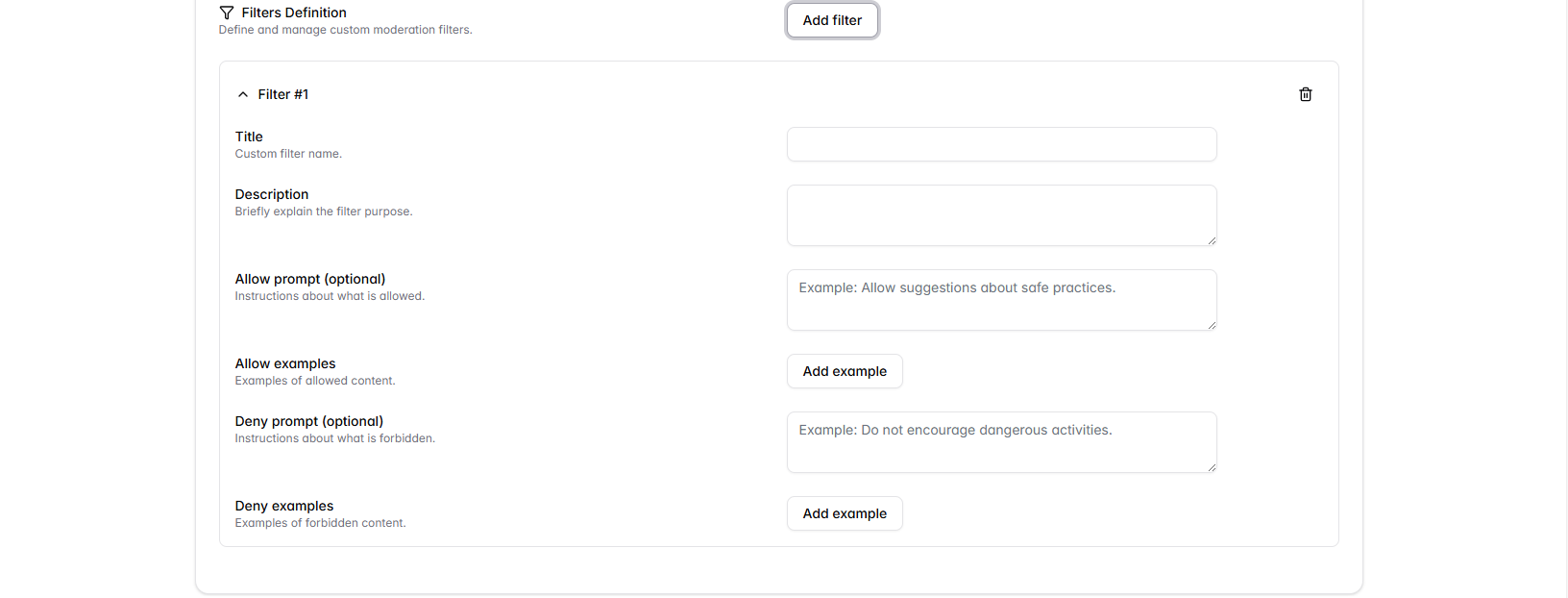
Filter Configuration Fields
Title
A descriptive name for your custom filter
- Examples: "Company Policy Violations", "Financial Compliance", "Brand Safety"
- Best Practice: Use clear, specific names that indicate the filter's purpose
Description
Briefly explain the filter's purpose and what it's designed to detect
- Include the business reason for the filter
- Specify what types of content it should catch
- Example: "Prevents AI from providing unauthorized financial advice while allowing general educational content about finance"
Allow Prompt (Optional)
Instructions about what content should be permitted
- Example: "Allow general educational information about financial concepts"
- Helps the AI understand acceptable content boundaries
- Use positive language describing what is acceptable
Allow Examples
Provide specific examples of content that should be permitted
- Click Add example to include multiple examples
- Use real-world scenarios that represent acceptable use cases
- Include variations in language and phrasing
Deny Prompt (Optional)
Instructions about what content should be forbidden
- Example: "Do not provide specific investment advice or recommendations"
- Helps the AI understand what content to block
- Use clear, specific language about prohibited content
Deny Examples
Provide specific examples of content that should be blocked
- Click Add example to include multiple examples
- Use clear examples that represent problematic content
- Include subtle variations that might try to bypass the filter
Custom Filter Examples
Example 1: Financial Compliance Filter
Title: "Investment Advice Compliance"
Description: "Prevents AI from providing unauthorized financial advice while allowing general educational content about finance"
Allow Prompt: "Allow general information about financial concepts, definitions, and educational content that doesn't constitute personalized advice"
Allow Examples:
- "Diversification means spreading investments across different assets"
- "A 401(k) is a type of retirement savings account"
- "Interest rates can affect bond prices"
Deny Prompt: "Do not provide specific investment recommendations, personalized financial advice, or predictions about specific investments"
Deny Examples:
- "You should invest 60% in stocks and 40% in bonds"
- "Apple stock will definitely go up next quarter"
- "Based on your age, I recommend this specific portfolio"
Example 2: Brand Safety Filter
Title: "Competitor Mentions"
Description: "Prevents inappropriate mentions of competitor products while allowing factual comparisons"
Allow Prompt: "Allow factual, neutral comparisons and general industry information"
Allow Examples:
- "There are several providers in this market segment"
- "Industry standards typically include these features"
- "Customers often evaluate multiple options"
Deny Prompt: "Do not recommend competitor products or make disparaging comments about our company"
Deny Examples:
- "You should try [Competitor] instead, they're much better"
- "Our product doesn't work as well as [Competitor]"
- "[Competitor] is the market leader in this area"
Best Practices for Custom Filters
Writing Effective Prompts
- Be Specific: Use precise language that clearly defines boundaries
- Use Positive Language: Frame allow prompts in terms of what should be included
- Consider Edge Cases: Think about borderline scenarios and how they should be handled
Creating Good Examples
For Allow Examples
- Use diverse, realistic scenarios
- Include different ways to express the same acceptable concept
- Cover various contexts where the content might appear
- Ensure examples clearly represent acceptable content
For Deny Examples
- Provide clear violations that should be blocked
- Include subtle variations that might try to bypass the filter
- Cover different phrasings of the same problematic content
- Test examples to ensure they trigger the filter appropriately
Testing Custom Filters
Before deploying custom filters:
- Use the Moderation Test: Test your filter with various content samples
- Test Edge Cases: Try borderline content to verify behavior
- Check False Positives: Ensure legitimate content isn't blocked
- Verify Coverage: Confirm problematic content is actually caught
- Get Stakeholder Feedback: Have relevant team members review the filter
Integration with Other Shield Components
Custom Filters work alongside:
- Standard Filters: Pre-configured categories that provide baseline protection
- Cybersecurity Protection: Security-focused filtering
- Shield Settings: Overall configuration that affects how custom filters operate
Next Steps
After creating Custom Filters:
- Enable Cybersecurity Protection for comprehensive security
- Test your complete shield configuration using Management and Testing
- Monitor filter performance and adjust as needed
- Create additional filters based on emerging organizational needs