Agent Configuration
Agent configuration consists of the following key areas:
- Basic Information - Name, description, and core identity
- Job Profile - Role definition and responsibilities
- Core Capabilities - System-level features and tools
- Interaction Examples - Training examples for behavior
Agent Naming
Use descriptive, specific names indicating purpose. Include domain or function. Keep professional and clear.
✅ Good Examples: "Marketing Content Creator", "Customer Support Specialist", "Financial Data Analyst"
❌ Avoid: Generic names ("Helper"), overly long names, unclear functions, unprofessional names.
Job Profile Configuration
The Job Profile is the most critical configuration element. It defines your agent's role, personality, and behavior patterns—essentially serving as the "onboarding instructions" that shape how your agent thinks and responds.
The Job Profile defines your agent's behavior, not its technical configuration. You're not describing available data sources or tools, the platform handles that automatically. Instead, you're defining:
- Who they are - Their role and expertise
- What they do - Their responsibilities and approach to work
- How they communicate - Tone, style, and response structure
- How they use information - Guidelines for interpreting data and sources
- What their boundaries are - Limitations and important rules
The platform automatically handles technical details like database structures, knowledge sources, and available tools. Your Job Profile provides the human context—the business logic, interpretation guidelines, and behavioral expectations that make your agent effective.
Core Elements of an Effective Job Profile
While your agent will function with just a basic description, including these elements will significantly improve its performance and consistency. You can start with the essentials and add more detail as you refine:
You don't need all of this on day one. Many users start with Role Definition and Responsibilities, then add other elements based on how the agent performs in practice.
1. Role Definition
Clearly state what the agent is and what domain it specializes in. This establishes identity and sets expectations.
You are a [ROLE TITLE] specialized in [DOMAIN/INDUSTRY].
2. Responsibilities
Define specific tasks and focus areas. Be concrete about what the agent should help users accomplish.
Your primary responsibilities include:
- [Specific task or function]
- [Another key responsibility]
- [Additional focus area]
3. Expertise & Context
Describe the agent's knowledge domains and provide context for interpreting information. This helps the agent understand how to apply its knowledge.
You have expertise in:
- [Domain knowledge area]
- [Methodology or framework]
- [Specialized skill or understanding]

Context for your work:
- [Important business context]
- [Key definitions or interpretations]
- [Domain-specific considerations]
4. Communication Style
Define how the agent should structure responses and interact with users. This ensures consistency and appropriate tone.
Communication Style:
- [Tone: professional, friendly, technical, etc.]
- [Structure: bullet points, detailed explanations, step-by-step]
- [Level: beginner-friendly, expert-level, adaptive]
- [Interaction: asking clarifying questions, providing examples]
5. Source Usage & Limitations
Establish rules for how the agent handles information, sources, and its own knowledge boundaries. This is crucial for accuracy and trust.
Important Guidelines:
- Always cite sources when providing information from documents or searches
- If information isn't available in your knowledge sources, clearly state this
- Don't fabricate data or make assumptions beyond available information
- When uncertain, ask clarifying questions rather than guessing
- [Domain-specific data interpretation rules]
- [Preferred information sources or methods]
Advanced Mode
By default, the platform automatically rewrites and optimizes your Job Profile to improve clarity and consistency before using it as the agent's system prompt.
If you want your Job Profile to be used exactly as written—without any automatic rewriting—you can enable Advanced Mode from the dropdown inside the Job Profile section.
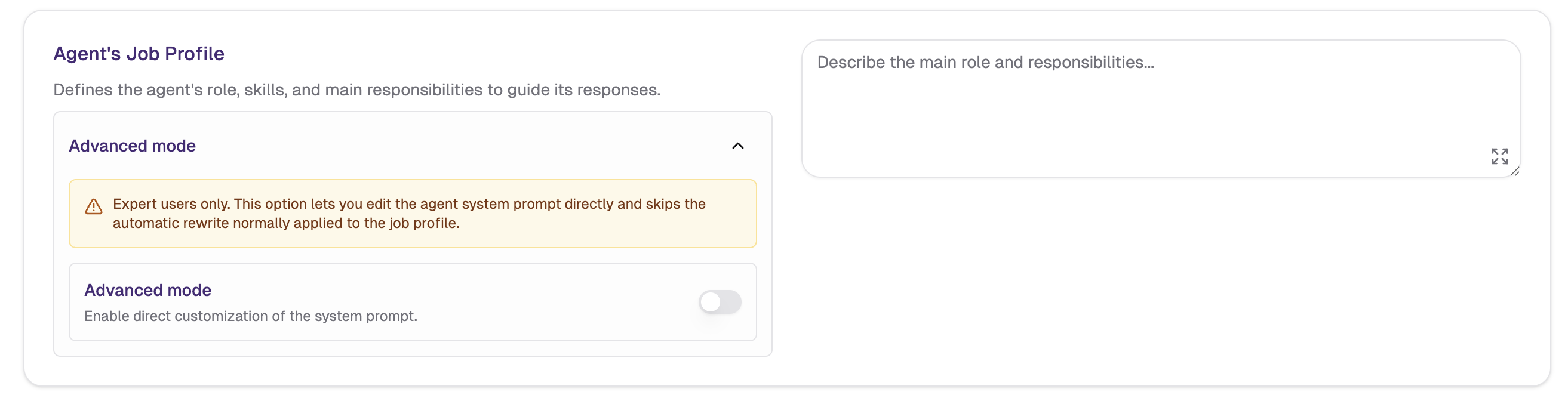
Enabling Advanced Mode will clear the current Job Profile. When you activate it, an alert pop-up will appear giving you the option to save the current content before it is lost.
Use Advanced Mode when:
- You've already crafted a precise, carefully worded prompt and don't want it altered
- You need full control over the exact wording and structure of the system prompt
- You're working with a prompt that includes specific formatting or instructions that must be preserved verbatim
What to Include (and What to Avoid)
You could include any of the examples below directly in a user prompt, of course. The Job Profile should contain information that persistently shapes the agent's knowledge and behavior—the "default" behavior that applies to all interactions. Save one-time instructions or context-specific details for individual prompts.
Examples of What to Include:
- Business logic: "When calculating revenue, exclude transactions marked as pending or refunded"
- Data interpretation rules: "Prioritize data from the current fiscal year unless otherwise specified"
- Preferred sources: "For market research, prefer recent industry reports and peer-reviewed studies"
- Response structure: "Always provide a brief summary before detailed explanations"
- Behavioral guidelines: "If a request falls outside your expertise, acknowledge limitations and suggest alternatives"
- Citation requirements: "Always reference the specific document or data source for factual claims"
Examples of What NOT to Include:
- Technical system details: "You have access to a PostgreSQL database with tables X, Y, Z..." ← The platform handles this
- Tool descriptions: "You can use web_search, database_query, and file_analysis tools..." ← Already configured
- Database schemas: "The sales table contains columns: id, date, amount, status..." ← Injected automatically
The platform builds the complete system context by combining your Job Profile with technical details about available tools, connected data sources, and uploaded files. Focus on the human instructions—the "why" and "how" rather than the "what exists."
Job Profile Template
You can use this template as a starting point, customizing each section for your specific agent:
You are a [ROLE TITLE] specialized in [DOMAIN/INDUSTRY].

Your primary responsibilities include:
- [Primary responsibility or task]
- [Secondary responsibility]
- [Additional function]

You have expertise in:
- [Domain knowledge area]
- [Methodology or approach]
- [Specialized skill]

Context for your work:
- [Business context or framework]
- [Key definitions specific to this domain]
- [Important considerations for interpretation]

Communication Style:
- [Tone and formality level]
- [Response structure preference]
- [Technical level appropriate for audience]
- [Interaction approach]

Important Guidelines:
- Always cite specific sources when providing information
- Clearly state when information is not available in your sources
- Don't fabricate or assume data beyond what's provided
- [Domain-specific interpretation rule]
- [Preferred information source or method]
- [Important limitation or boundary]
For detailed walkthroughs and before/after comparisons of Job Profiles in action, check out Agent Examples. Need help creating your Job Profile? Use Galene.AI Chat or the specialized "Job Profile Generator Agent" Agent to draft, refine, or improve your configuration. Just provide details about your agent's purpose, domain, and responsibilities, and get step-by-step guidance on role definitions, communication styles, and important guidelines.
Advanced Inference Settings
Advanced Inference Settings let you override the LLM's sampling parameters for a specific agent. These parameters control how the model generates text — from how random or focused it is, to how it handles repetition.
By default, the platform selects an optimized sampling profile automatically based on how the model is running the request (reasoning vs. non-reasoning mode, and whether the task involves coding). Enabling Override platform sampling parameters lets you set custom values that apply only to this agent. Keep the override off to inherit the platform's defaults.
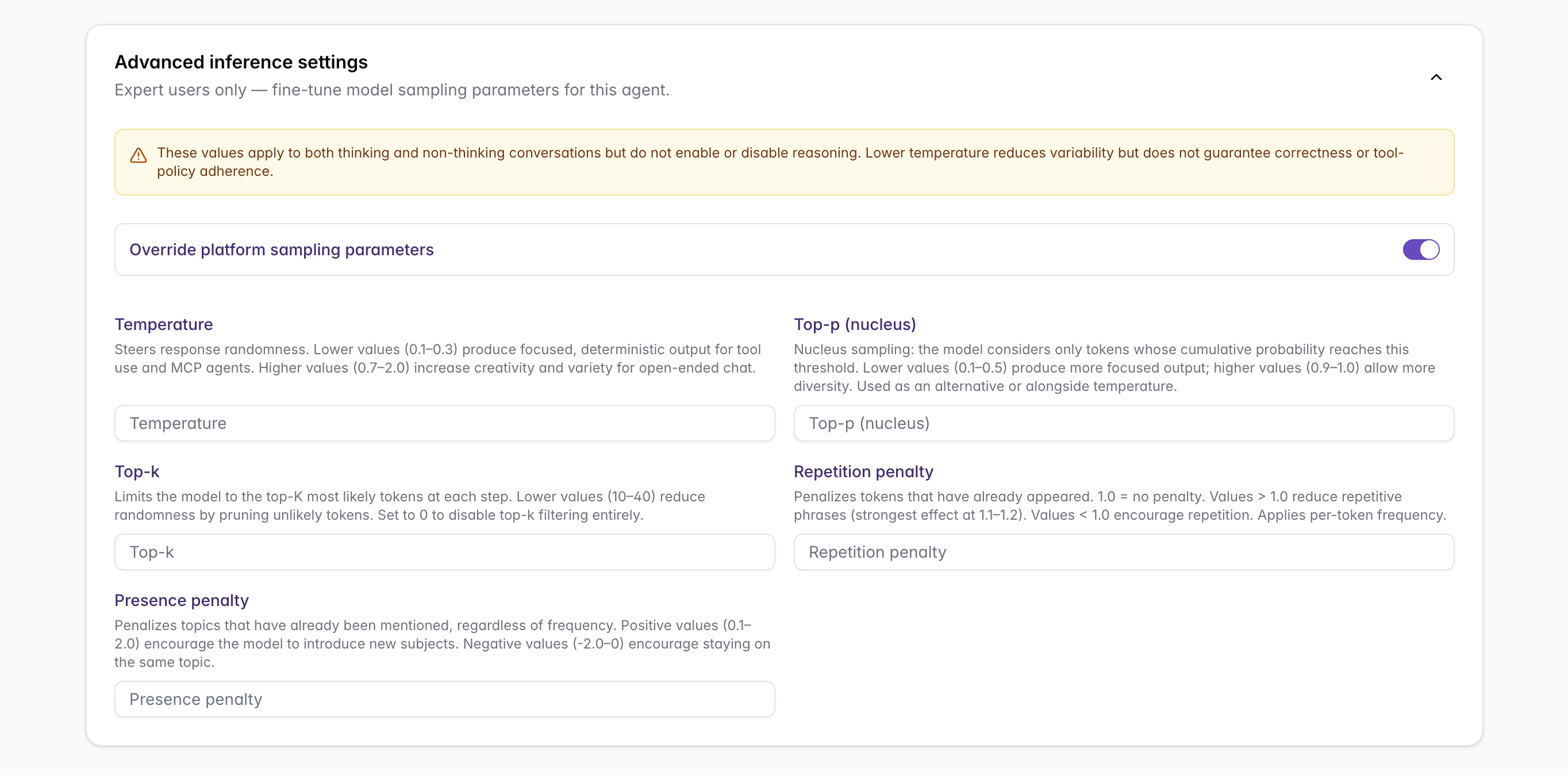
Your override values apply to this agent in both reasoning (thinking) and non-reasoning conversations. They do not enable or disable reasoning mode—they only change how the model samples tokens once it generates a response.
These are low-level model parameters. Small changes can significantly alter response quality. Start with one parameter at a time and test incrementally.
Parameter Reference
Temperature
Range: 0 – 2 | Default: platform-optimized
Controls randomness in the model's output. Lower values make responses more deterministic and focused; higher values increase creativity and variety.
- 0 – 0.3: Very deterministic. Good for factual answers, code generation, data extraction
- 0.4 – 0.7: Balanced. Good for general conversation, content creation
- 0.8 – 1.5: Creative. Useful for brainstorming, storytelling, varied rephrasing
- 1.6 – 2: Maximum creativity. May produce less coherent or unexpected output
Top-P (Nucleus Sampling)
Range: 0.05 – 1 | Default: platform-optimized
Controls the cumulative probability threshold for token selection. The model considers tokens whose combined probability reaches top_p and discards the rest. Lower values make output more focused; higher values allow more diversity.
- 0.1 – 0.4: Very focused. Model sticks to high-probability tokens
- 0.5 – 0.8: Balanced. Good middle ground for most use cases
- 0.9 – 1: More diverse. Allows less probable but potentially more interesting tokens
Temperature and Top-P work together. A common strategy: keep one at its default and adjust the other. Using both extremes simultaneously can produce unpredictable results.
Top-K
Range: 0 – 100 | Default: platform-optimized
Limits token selection to the top_k most probable tokens at each generation step (0 means no limit). Lower values produce more focused and predictable output; higher values allow more variety.
- 0: No limit — considers all possible tokens
- 10 – 30: Moderate filtering. Balanced for most use cases
- 40 – 100: Very permissive. Allows the model to consider many candidates
Repetition Penalty
Range: 0.05 – 2 | Default: platform-optimized
Penalizes tokens that have already appeared in the generated text. Values higher than 1 reduce repetition; values lower than 1 encourage it. A value of 1 means no penalty.
- 1 – 1.1: Mild penalty. Reduces obvious repetition without forcing vocabulary switching
- 1.1 – 1.3: Moderate penalty. Good for technical writing, reports, structured output
- 1.3 – 2: Strong penalty. Useful for creative writing where variety is critical; may occasionally produce unnatural word choices
Presence Penalty
Range: -2 – 2 | Default: platform-optimized
Penalizes tokens based on whether they have appeared at all in the text so far (regardless of frequency). Positive values encourage the model to talk about new topics; negative values encourage staying on the same topic.
- -2 – -0.5: Negative — encourages focusing on the same subject matter
- -0.5 – 0.5: Neutral — no strong directional bias
- 0.5 – 1.5: Mild to moderate push toward topic diversity
- 1.5 – 2: Strong push toward new topics. Useful for extended brainstorming
Practical Combinations
Set only the parameters relevant to your goal; leave the rest at default (blank) to keep the platform's optimized value.
| Goal | Temperature | Top-P | Top-K | Repetition Penalty |
|---|---|---|---|---|
| Factual Q&A / data extraction | 0.1 – 0.3 | default | default | default |
| Deterministic tool use (MCP, structured output) | ~0.2 | default | default | default |
| Code generation | 0.2 – 0.4 | default | default | default |
| Creative writing / brainstorming | 0.8 – 1.2 | 0.9 – 1 | 60 – 100 | 1.1 – 1.3 |
| Translation | 0.3 – 0.5 | default | default | default |
Temperature is the primary knob for most goals—lower for focused, deterministic output, higher for variety. A low temperature reduces output variation (recommended for tool-calling and MCP agents) but does not by itself guarantee factual correctness or tool-policy adherence.
How Overrides Work
The override system applies in this order:
- The platform selects a default sampling profile based on how the request runs (reasoning vs. non-reasoning mode, general vs. coding task)
- Platform defaults fill any parameters you leave blank
- Your override values overwrite the corresponding platform defaults
This means you only need to set the parameters you want to change — leave a field empty and it keeps the platform's optimized default for that parameter. Turning the override toggle off restores platform defaults for all parameters.
Core Capabilities
Core capabilities are optional features you can enable to enhance your agent's functionality.
Web Search
Enables your agent to search the internet for current information in real-time. When enabled, the agent can access up-to-date information beyond its training data and your uploaded knowledge sources.
When to Enable:
- Agent needs current events or recent developments
- Tasks require real-time data (prices, news, trends)
- Research and competitive intelligence gathering
- Market analysis and trend monitoring
How It Works:
When a user asks a question with the web search option enabled and selected, the agent determines if web search would be helpful, performs searches automatically, and includes citations from sources in its responses.
For a detailed explanation of web search functionality, including how it works in conversations, best practices, and example use cases, see Web Search Capability in Chat Usage.
- Code Execution: Allow Agents to write and execute Python code for data analysis and calculations
- Data Visualization: Generate charts and graphs from data
Next Steps
After understanding agent configuration:
- Create Your First Agent: Build your first agent using these configuration principles
- Connect Data Sources: Link your agent to information and systems
- Learn About Sharing: Collaborate with team members
For organization-wide agent configuration and advanced administrative settings, see the Admin Agent Management Documentation.