Organization Management
Organization Management is the core Super Admin functionality that allows you to create, configure, and manage multiple organizations within your Galene AI Platform installation. As a Super Admin, you have complete access and control over all organizations in the system.
Super Admin features are exclusively available to users with system configuration privileges. These tools allow you to configure platform-wide settings that affect all organizations and users on the system.
Overview
As a Super Admin, you have comprehensive control over all organizations in your Galene AI Platform installation. This includes:
- Full Access: View and manage all organizations in the system
- Organization Creation: Create new organizations with custom configurations
- Organization Switching: Seamlessly switch between different organizations
- Global Oversight: Monitor and manage organization-specific settings and users
Licensing and Multi-Organization Support
The ability to create and manage multiple organizations depends on your Galene.AI license tier. Multi-tenancy is not included in all license packages.
Base License Includes:
- Production (Live) Organization - Your main production environment
- Test Organization - Development and testing environment
Additional Organizations require an upgraded license tier. Contact your Galene.AI representative for information about multi-organization licensing options.
Understanding your license limitations is important when planning your organizational structure. If you require multiple organizations for different departments, business units, or customer segments, ensure your license supports the number of organizations you need.
Organization Dashboard
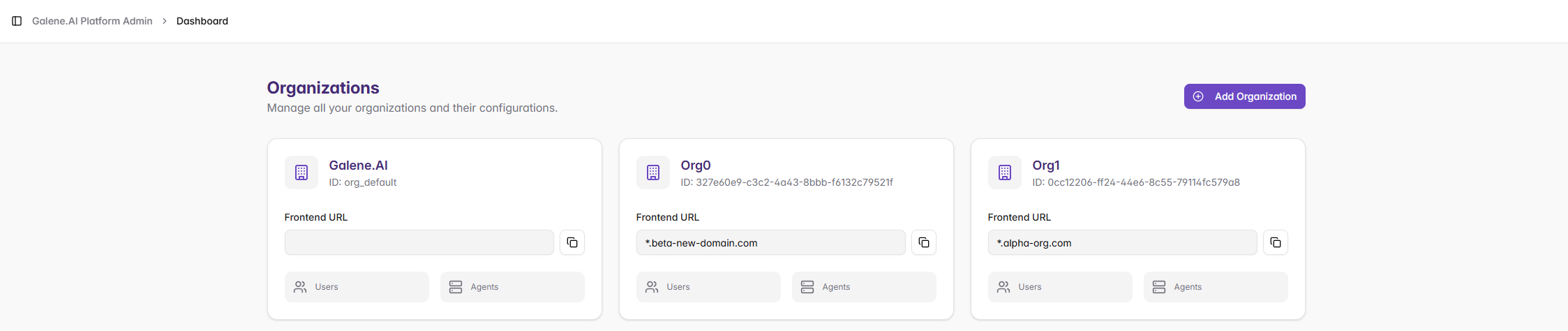
The main Organizations dashboard provides an overview of all organizations in your system, allowing you to manage them efficiently.
Dashboard Features
Organization Cards
Each organization is displayed as a card showing:
- Organization Name: The display name of the organization
- Organization ID: Unique identifier for the organization
- Frontend URL: The custom domain or URL for the organization
- User Count: Number of users in the organization
- Agent Count: Number of agents configured for the organization
Available Actions
For each organization, you can:
- Access Organization: Click to enter and manage the specific organization
- View Details: Review organization configuration and statistics
- Manage Settings: Configure organization-specific settings
- Add Organization: Create new organizations using the "+ Add Organization" button
Creating New Organizations
The organization creation process allows you to set up new isolated environments within your platform installation.

Organization Creation Fields
Organization Name
Display name that appears throughout the platform to users and administrators.
Frontend Domain
Custom domain where users access this organization's platform. Must be properly configured in DNS and unique across all organizations.
SSL Certificate (.pem)
SSL certificate for the custom domain in PEM format. Must match the domain exactly and include the full certificate chain.
SSL Private Key (.pem)
Private key corresponding to the SSL certificate in PEM format. Keep secure and ensure it's not password-protected.
Organization Creation Process
- Plan: Determine name, secure custom domain, and obtain SSL certificates
- Prepare SSL: Generate certificate with full chain and corresponding private key
- Configure DNS: Set up DNS records pointing domain to platform installation
- Create: Enter details in form and paste SSL configuration
- Verify: Test domain access and SSL functionality
Organization Switching
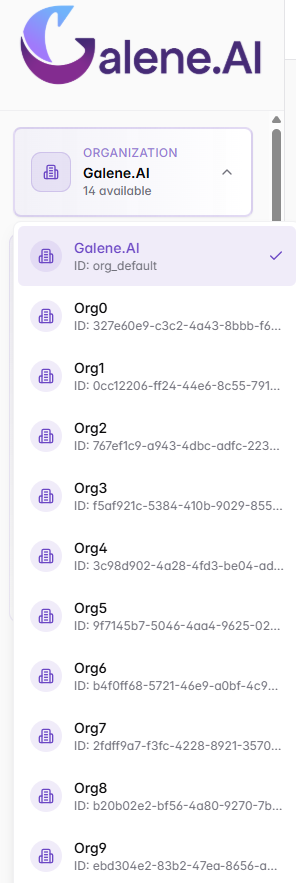
The Super Admin interface includes an organization selector that allows you to switch between different organizations seamlessly.
Organization Selector Features
Current Organization Display
- Shows the currently selected organization name
- Displays the total number of organizations accessible
- Provides quick visual confirmation of your current context
Organization List
The dropdown shows all available organizations with:
- Organization Name: Display name for easy identification
- Organization ID: Unique system identifier
- Selection Status: Checkmark indicates currently selected organization
Switching Organizations
- Click on any organization to switch to it
- No page reload required - seamless transition
- All admin functions immediately apply to the selected organization
- Your permissions and access remain consistent across organizations
Multi-Organization Access Control
As a Super Admin, you have special privileges across all organizations:
Access Levels
Global Access: Complete administrative control across all organizations with ability to move between them without restriction.
Organization-Specific: Full access to standard admin features (user management, agents, connectors, security) within each organization.
Super Admin Exclusive: Organization creation, platform configuration, cross-organization management, and system monitoring capabilities.
Management Best Practices
Planning: Design organizations with clear boundaries, use consistent naming conventions, plan domain structure, and consider resource requirements.
Security: Keep SSL certificates current, ensure domain security, audit access regularly, and maintain proper data isolation.
Operations: Monitor organization health, coordinate platform updates, implement comprehensive backup strategies, and establish support processes.
Lifecycle Management
Creation: Define requirements, configure domains/SSL, set up initial users, and customize settings.
Active Management: Monitor usage and performance, maintain certificates, apply updates, and provide ongoing support.
Retirement: Backup data, assist user migration, clean up resources, and maintain audit documentation.
Common Issues
SSL Problems: Monitor certificate expiration, ensure domain matching, verify complete certificate chain, and confirm private key correspondence.
Domain Access: Verify DNS resolution, test network connectivity, check browser-specific issues, and clear caches when needed.
Configuration Issues: Verify organization creation completion, confirm user access permissions, and test external system connections.
Organization Management provides complete control over all organizations within your Galene AI Platform installation.